




Welcome to our MT5 mobile app overview, where you’ll discover how MetaTrader 5 revolutionizes trading on the go! With its user-friendly interface, advanced charting tools, and access to a wide range of financial instruments, the MT5 mobile app empowers traders to manage their portfolios anytime, anywhere. Dive into our detailed overview and unlock the full potential of mobile trading today!
Importance of Mobile Trading

- Accessibility and Convenience: Mobile trading allows you to trade anytime, anywhere, providing real-time monitoring and flexibility to capitalize on market opportunities.
- Instant Trade Execution: With mobile apps, you can execute trades quickly, ensuring you don’t miss out on fast-moving markets. Push notifications keep you updated on price changes and news.
- Advanced Tools: Mobile platforms offer comprehensive charting tools and integrated news feeds, enhancing your analysis and decision-making on the go.
- Enhanced User Experience: User-friendly designs and customization options improve navigation and streamline trading, making it easier to manage your investments.
- Cost-Effective Trading: Many mobile apps feature lower fees or commission-free trading, reducing costs while providing the same functionalities as desktop platforms.
- Improved Risk Management: Set stop-loss and take-profit orders easily, allowing you to manage risk and protect your portfolio effectively.
See now:
- What is MT5 software? Basic steps using MT5 you need to know
- Comparing MT5 vs cTrader platform – Which platform is better?
- MT5 demo account explained – Opening a Free MT5 Demo Account
- Custom indicators – Install MetaTrader 5 custom indicators
Key Features of the MT5 mobile app overview

- User-Friendly Interface: The MT5 mobile app overview provides an intuitive and customizable interface, making it easy for traders to navigate, place trades, and monitor their portfolios.
- Advanced Charting Tools: The app offers interactive charts with various timeframes and chart types, along with over 30 technical indicators to perform detailed market analysis.
- Multiple Order Types: MT5 supports several order types, including market, limit, stop, and trailing stop orders, giving traders flexibility in executing their strategies.
- Economic Calendar and News Feed: Stay informed with real-time financial news and an integrated economic calendar that helps traders track important market events and their potential impact.
How to download and install the application on MT5 mobile app
Follow these simple steps to download and install the MT5 mobile app overview application on your device:
For Android Users
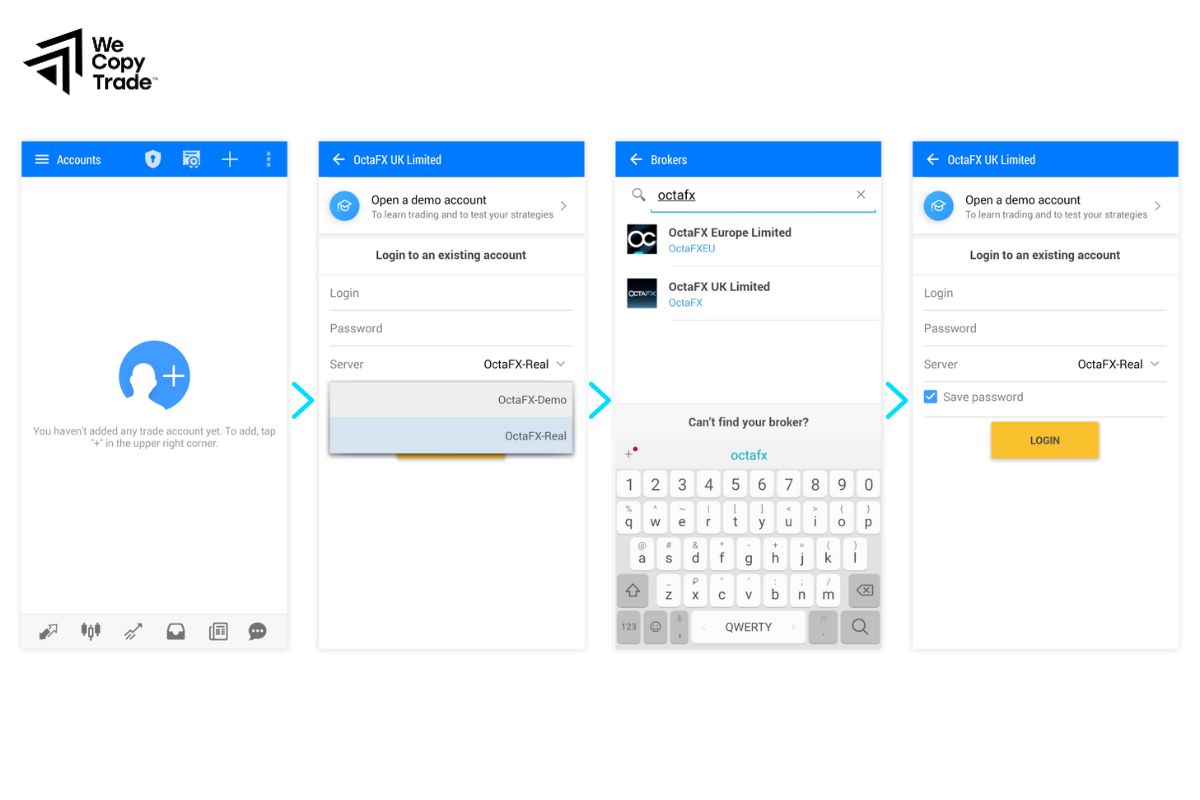
- Step 1: Open the Google Play Store on your Android device.
- Step 2: In the search bar, type “MetaTrader 5” and select the official app by MetaQuotes Software.
- Step 3: Click the “Install” button to download the app.
- Step 4: Once installed, open the app and sign in with your existing trading account or create a new account.
For iOS Users

- Step 1: Open the App Store on your iPhone or iPad.
- Step 2: Search for “MetaTrader 5” and select the app developed by MetaQuotes Software.
- Step 3: Tap “Get” and then “Install” to download the app.
- Step 4: After installation, launch the app and either log in with your broker credentials or sign up for a new account.
Strategies for managing trades on mobile
Managing trades on the go with a mobile app like MT5 requires strategic approaches to stay efficient and profitable. Here are some key strategies:
Set Clear Entry and Exit Points
- Define Entry Levels: Use limit or stop orders to automate trade entries at predefined price levels, reducing the need to monitor markets constantly.
- Establish Exit Strategies: Pre-plan your exit with take-profit and stop-loss orders to protect profits and limit losses.
Utilize Push Notifications
- Market Alerts: Set up push notifications for price movements, news, or trade execution, ensuring you’re updated without checking the app frequently.
- Economic Events: Stay informed of market-moving events by enabling notifications for economic calendar updates.
Use Technical Indicators Wisely
- Mobile Charting: Take advantage of MT5’s advanced charting tools and technical indicators to analyze market trends and patterns before placing trades.
- Combine Indicators: Use a combination of trend-following and momentum indicators (e.g., moving averages, RSI) to improve trade decisions.
Regular Monitoring and Adjustments
- Check Market Conditions: Periodically review trades and make necessary adjustments based on evolving market conditions.
- Adjust Orders: Modify stop-loss or take-profit levels as your position moves in your favor to maximize gains or reduce potential losses.
Stay Disciplined
- Stick to Your Plan: Avoid impulsive trades by sticking to your trading plan and risk management rules, even when trading from a mobile device.
- Avoid Overtrading: Limit the number of trades to avoid emotional decisions and maintain clear focus.
FAQ about MT5 Mobile App Overview
The MT5 mobile app overview is a powerful tool for modern investors, helping you to make financial transactions conveniently and quickly right on your mobile device:

Can I use the MT5 mobile app with my existing account?
- Yes, you can use the MT5 mobile app with your existing MetaTrader 5 account. Simply log in using your broker’s server and your account credentials.
Does the MT5 mobile app support technical analysis?
- Yes, the app includes over 30 technical indicators, interactive charts, and timeframes to help you perform in-depth market analysis.
Can I trade directly from charts on the MT5 mobile app?
- Yes, you can place and manage trades directly from the interactive charts within the MT5 mobile app, making it easy to execute trades based on real-time market analysis.
Are there demo accounts available on the MT5 mobile app?
- Yes, you can open a demo account through the MT5 mobile app to practice trading without risking real money.
Conclusion
In conclusion, MT5 mobile app overview, we highlight the app’s powerful features, including multi-asset trading, advanced charting tools, and real-time access to global markets. Ready to take your trading to the next level? Download the MT5 mobile app today and start experiencing seamless, real-time trading from your mobile device.
See more:

