












MT4 is an effective trading platform that is becoming more and more popular. One of the outstanding features that has helped it maintain such a high position over the years is its ability to manage risks and maximize profits with trailing stops. After following the article below, I believe you will soon have a MT4 trailing stop setup because of its effectiveness.
What is a trailing stop?
Trailing stop is a useful tool that helps investors protect profits and minimize risks in trading. When the market moves in a favorable direction, it will automatically adjust, helping you maximize profits. Conversely, if the market moves against your prediction, this tool will adjust your position to limit losses.

You will set a certain distance (called “stop distance”) from the current price. When the market price moves in a favorable direction, the stop order will also move, always keeping the set distance. This helps you lock in profits gradually and minimize the risk of reversal.
For example, you buy a stock at 100 VND and place a trailing stop order with a distance of 5 VND. When the stock price increases to 105 VND, your stop order will also automatically increase to 110 VND. This means that if the stock price falls below 110 VND, the stop order will be triggered and you will sell the stock to protect your profit.
See more:
- Top Global Trading Indices – How to trade indices on MT4
- MT4 Plugins for Traders – How to Install Plugins Quickly
- MT4 multi-account management – Is MAM Trading Safe?
- How to trade crypto on MT4 effectively and reliably
Pros and Cons of a Trailing Stop Order

Trailing Stop Order is a useful trading assistant. However, any tool has its own advantages and disadvantages. Let’s find out what they are to maximize the benefits and avoid risks in your trading right below:
Pros of a trailing stops
- Protection when the market is rising: trailing stop orders always follow closely behind every activity, helping you lock in profits when the stock price increases. When the stock price increases, the trailing stop order will automatically adjust to protect the profits you have.
- Flexible customization: you can completely adjust the distance that the trailing stop order will move. For example, if the market is volatile, you can increase this distance to better protect profits. Conversely, if the market is moving sideways, you can reduce the distance to recover profits faster.
- Save time: you don’t need to sit in front of the screen to monitor every small fluctuation of the market. The system will automatically execute the order, giving you more time to do other things.
- No fees: you do not have to pay any additional fees when using a trailing stop loss order. This is an extremely useful and cost-saving tool for investors.
Cons of a Trailing Stop
Like any other tool, trailing stop loss orders also have certain limitations that investors need to note:
- Trailing stop loss orders make us feel more secure when trading, but do not always ensure timely loss cutting. In some unexpected market situations, the stop loss order may be triggered earlier than expected.
- Setting a reasonable stop loss distance is very important, but not easy. Too close can lead to early loss cutting, too far is not effective in limiting risk.
- When the market fluctuates strongly, the stop loss order may be triggered randomly, causing investors to miss good opportunities.
Stop loss orders are just a supporting tool, not the only solution for risk management. Therefore, to make the right investment decision, you should combine them with other technical analysis tools and regularly re-evaluate stop loss orders according to market developments.
How to Add a Trailing Stop on the Trade Ticket
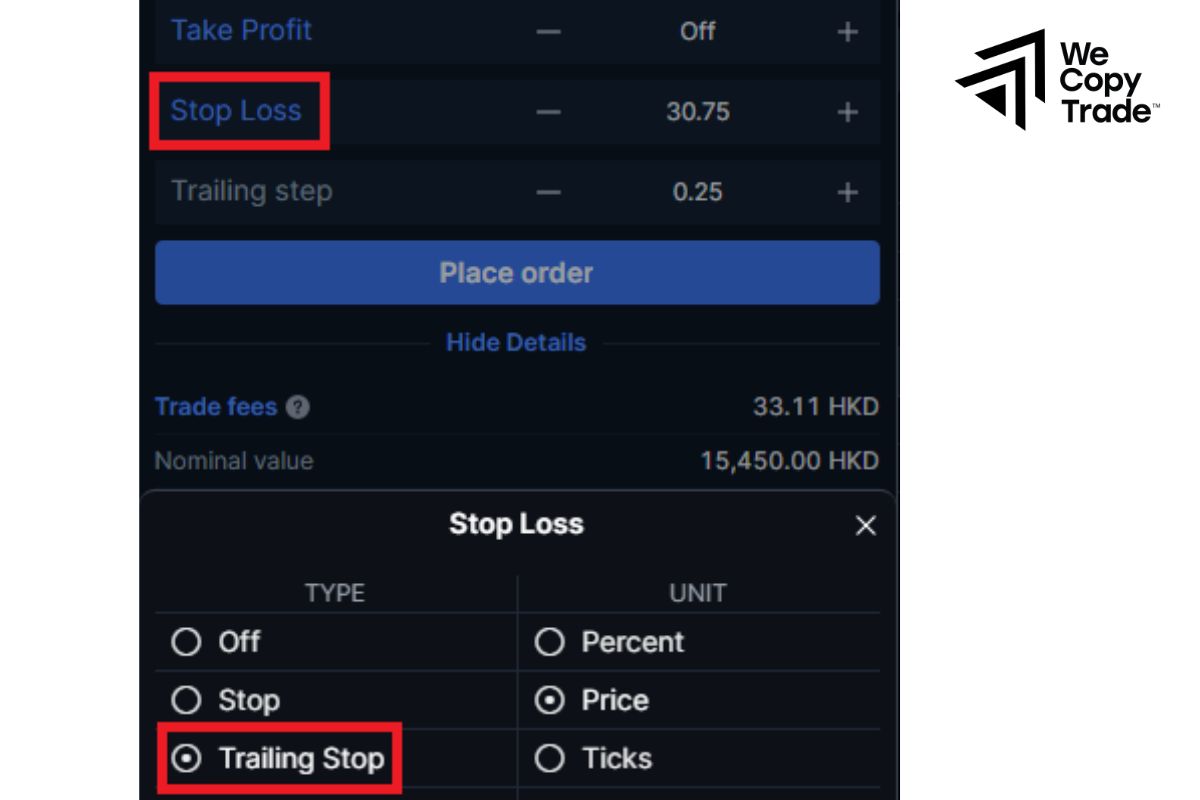
How to place a trailing stop order:
- In your order management, find and click on the drop-down menu of the order you want to place a trailing stop on.
- In the drop-down menu, select the “Trailing” or “Trailing stop” option.
Set the parameters:
- Stop point: This is the point at which you want the stop order to be triggered the first time.
- Trailing step: This is the distance the stop order will move each time the market price moves in your favor.
For example, you buy 1 unit of DAX 40 when the price is at 10,450. You want to protect your profits and place a trailing stop order as follows:
- Initial stop: 10,435 (15 points away from the current price).
- Trailing step: 5 points.
If the price of DAX 40 increases to 10,455 (up 5 points), your stop order will automatically adjust to 10,440 (still 15 points away from the current price). If the DAX 40 price falls below 10,440 (current stop), your order will be closed to limit losses.
When to Use Trailing Stop Orders

Trailing stop orders only work during regular stock market trading hours, which are typically 9:30 a.m. to 4 p.m. ET. Outside of these hours, such as before the market opens, after the market closes, or on holidays, trailing stop orders will not be executed.
Order duration:
- You can choose to have your trailing stop order only work for one trading day or until you cancel it.
- Day order: This order will automatically expire at the end of the trading day if it has not been triggered.
- Good-till-canceled (GTC) order: This order will remain in effect until it is executed or you cancel it, up to a maximum of 180 days. However, GTC orders can only be executed during regular trading sessions.
Understanding the duration of trailing stop orders helps you decide the right time for your trailing stop order to take effect, choose the right order type for your trading plan to protect your account. You won’t have to worry about trailing stop orders being executed outside of trading hours or when the market is closed.
MT4 trailing stop setup
Step 1: Set Initial Stop Loss
When you open a new position, you will have the option to set an initial stop. Make sure you set this up before adding a Trailing Stop.
Step 2: Add a Trailing Stop
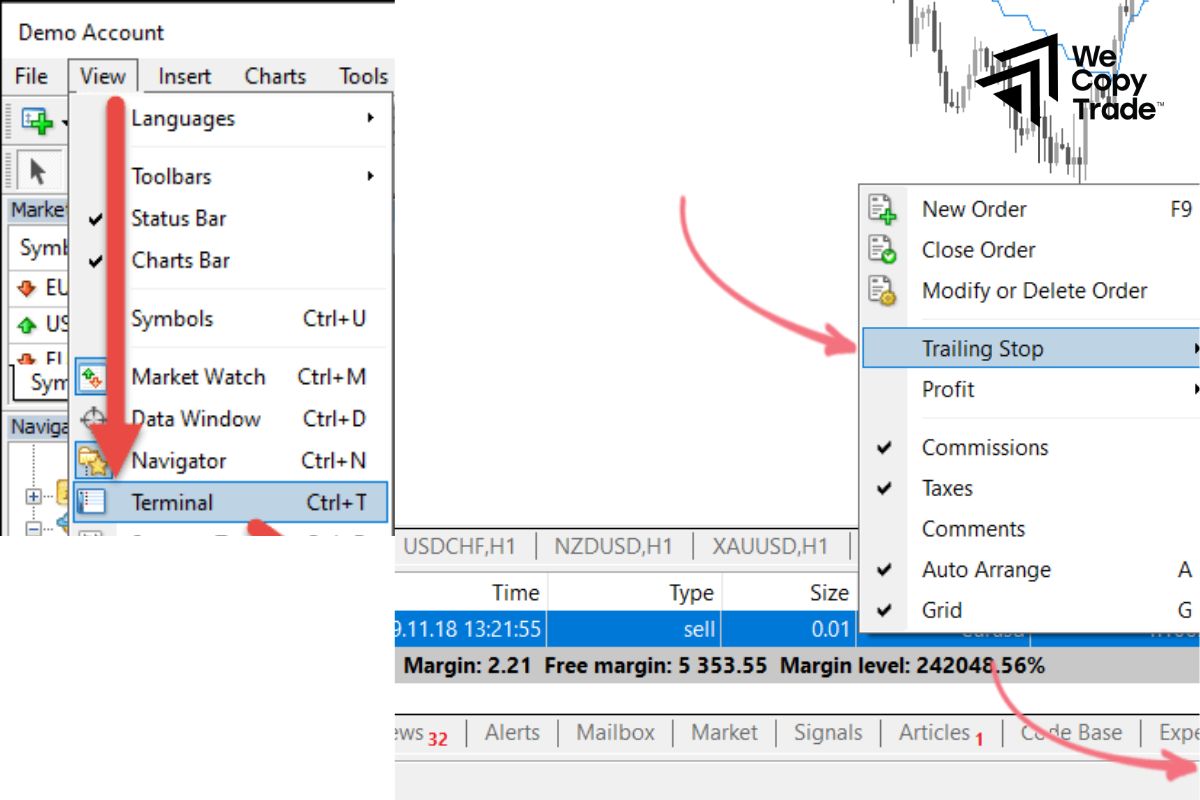
In the MT4 “Terminal” window, find and right-click the order you want to add a Trailing Stop to.
A drop-down menu will appear, select the “Trailing Stop” option.
Configure the Trailing Stop:
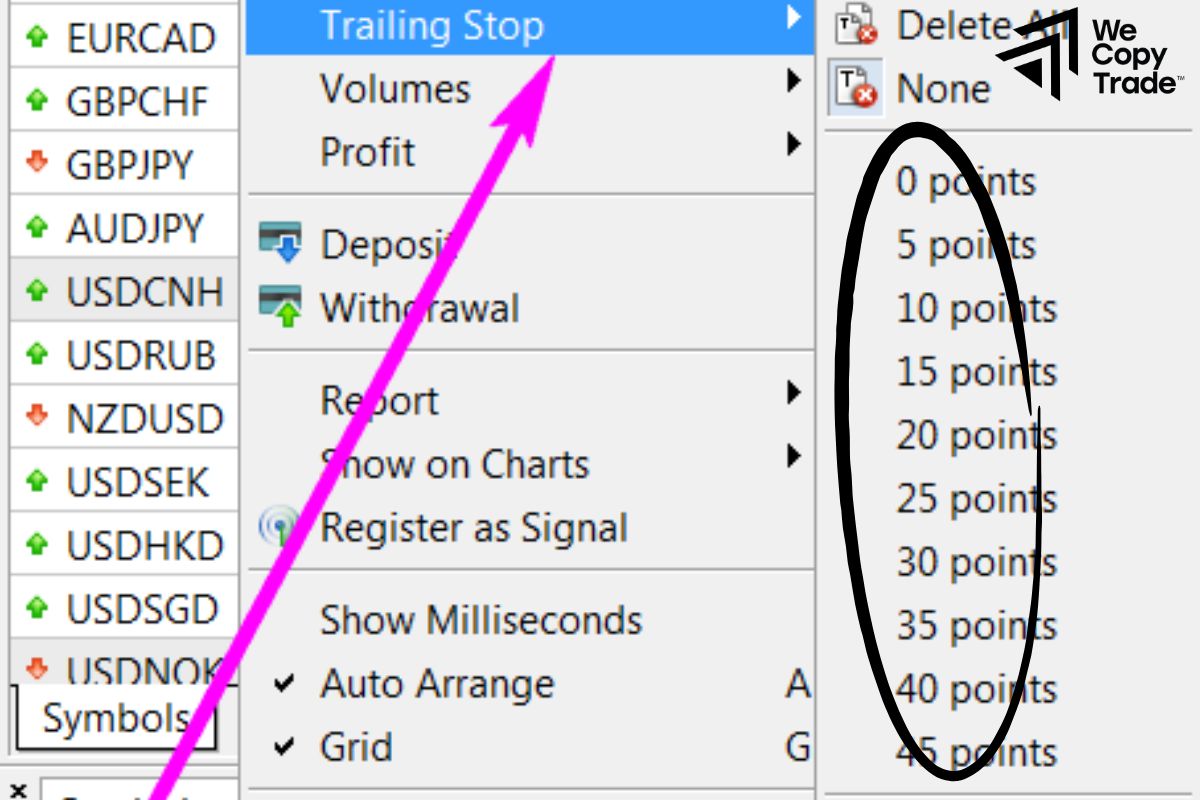
- Enter the number of points you want your stop loss to move. For example, if you enter “100”, it means your stop loss will move 10 pips every time the market price moves in your favor.
- Some MT4 platforms may offer additional features such as “Points”, “Pips”, or “Percentage” to choose the unit of measurement.
Step 3: Understand How Trailing Stops Work
A Trailing Stop will always move in your favor, keeping a fixed distance from the current price. If the market reverses and the price falls below the Trailing Stop, the order will be triggered and your position will be closed. If the market moves only against you, the Trailing Stop will not be triggered unless you have placed an initial stop order.
Conclusion
In conclusion, Trailing stop is a tool that is highly trusted by top investors. As you have seen above, besides its outstanding features, this tool also has certain risks. To ensure safety, after getting MT4 trailing stop setup, you should experience it on a demo account to master it.
See now: