












In the world of Prop Trading (fund trading), the way traders place orders in MT4 can be the difference between earning thousands of dollars in profit and violating account drawdown rules due to a single mistaken mouse click.
At WeMasterTrade, we have witnessed many talented traders lose their funding eligibility simply because of basic mistakes such as: forgetting to set a Stop Loss, entering the wrong volume (lot size), or not knowing how to take profit in time.
This article will guide you on how to place orders in MT4 accurately and set Take Profit in MT4 according to the risk control process that professional fund traders are applying. Before placing an order, make sure you have set up an easy-to-read chart following the basic MT4 usage guide.
1. Open the order window (New Order)
Before entering a trade, take a deep breath and clearly define your plan. To open the order panel, you have 3 ways:
Method 1 (Recommended): Press the F9 shortcut key. This is the fastest way.
Method 2: Double-click the currency pair you want to trade in the Market Watch panel.
Method 3: Right-click on the chart → Trading → New Order.
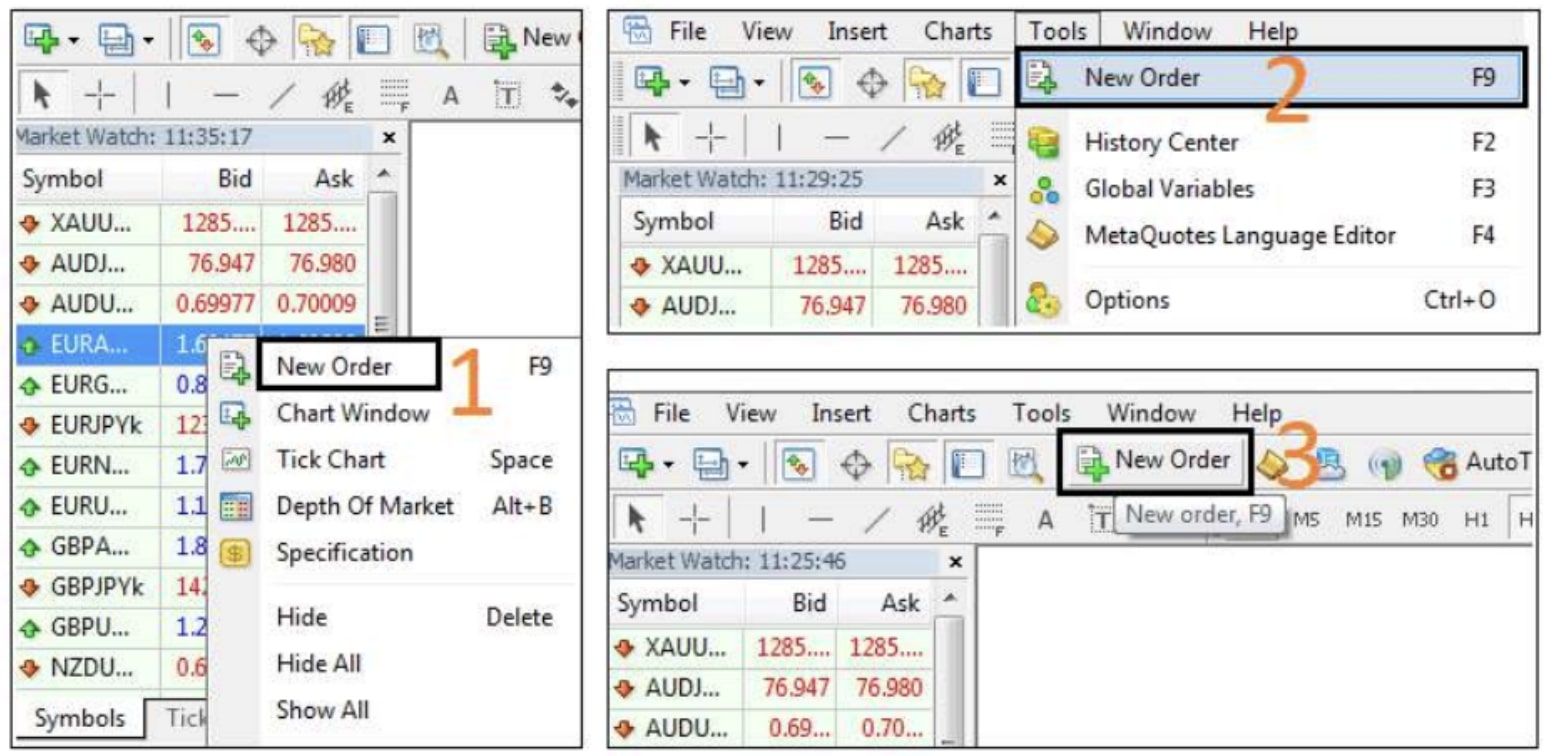
2. Set up order parameters (More important than the entry point)
This is the step that determines the safety of your account. Fill in the following one by one:
- Symbol: Recheck whether you are selecting the correct currency pair (It is very easy to confuse XAUUSD with another pair).
- Volume: This is the “fatal point.”
- Fund trader mindset: Always calculate the lot size so that if Stop Loss is hit, you only lose 1–2% of the account.
- Absolutely avoid the “fat finger” mistake: Intending to trade 0.1 lot but mistakenly typing 1.0 lot → Account blown immediately.
- Stop Loss: Enter the price level at which you accept being wrong. Never leave this field blank.
- Take Profit: Enter the target price.
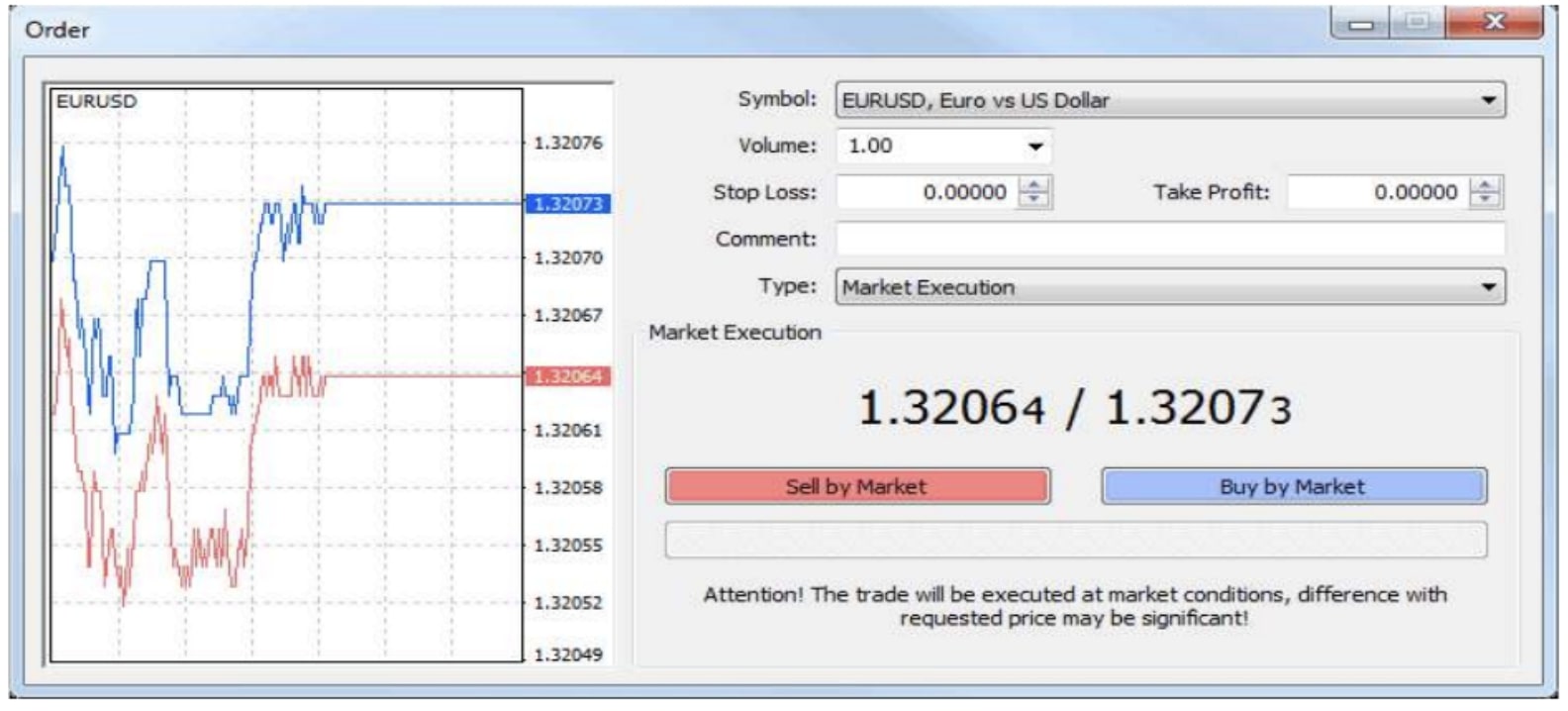
3. Execute the order: Buy/Sell or Pending Order
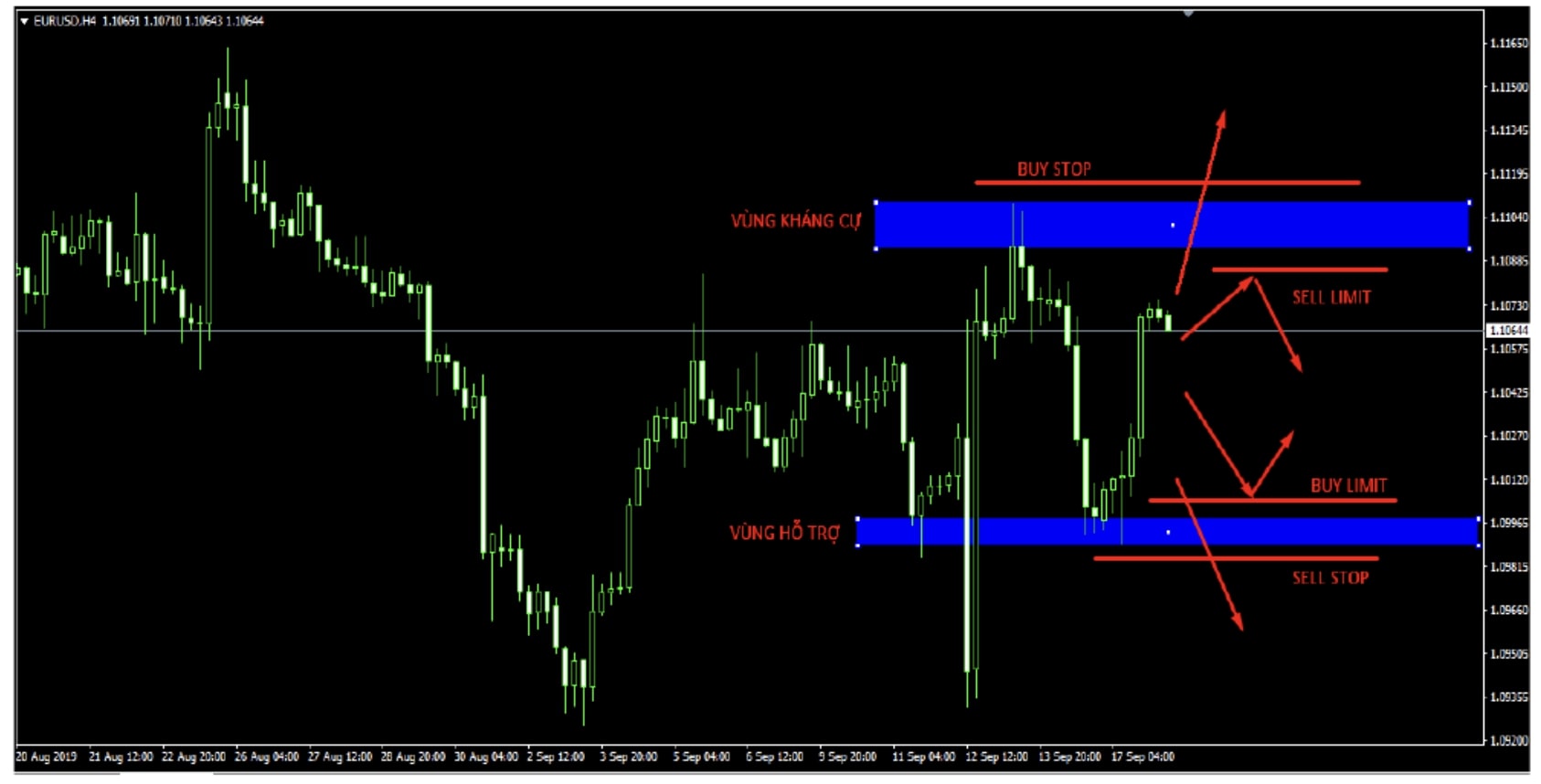
In the Type section, you have 2 strategic choices:
A. Market Execution (Enter immediately)
Use when you see a good price and want instant execution.
- Select Sell by Market (Red) if you expect the price to fall.
- Select Buy by Market (Green) if you expect the price to rise.
B. Pending Order (Pending order)
Use when you are busy or want the price to reach the exact level before entering (high discipline).
- Buy Limit / Sell Limit: Buy lower / Sell higher than the current price (Reversal trading).
- Buy Stop / Sell Stop: Buy higher / Sell lower than the current price (Breakout trading).
Do not enter trades emotionally. Find good entry points based on signals from effective technical indicators (Indicators).
4. How to set & drag Take Profit/Stop Loss quickly (Pro Tip)
Instead of manually typing each number into the order panel, real traders at WeMasterTrade often use direct drag-and-drop on the chart to react quickly to the market:
Show price lines: Go to Tools → Options → Charts, check “Show trade levels.”
- Drag-and-drop actions:
- After the order is executed, you will see a horizontal dashed line showing the entry position.
- Set Take Profit MT4: Click on the order line, hold the mouse, and drag it toward the profit side (For example: for a Buy order, drag upward).
- Set Stop Loss: Click on the order line, hold the mouse, and drag it toward the loss side.
- Adjust: You can move these SL/TP lines at any time by dragging again.
5. “Survival” rules to protect your WeMasterTrade account
To become a Funded Trader and maintain long-term profitability, you must follow these 3 order placement rules:
- Rule 1: “No Stop Loss, No Entry”
Never click Buy/Sell thinking “I’ll set the SL later.” The market only needs 1 second of strong volatility (news release) for your account to “evaporate.” With a fund, not setting SL means poor risk management. - Rule 2: Do not move Stop Loss when in loss
If the price moves close to SL, let it hit. Absolutely do not widen SL to hold losses. This is gambling behavior, not investing. - Rule 3: Preserve profits (Trailing Stop)
When the price moves in the right direction and you are in profit, move Stop Loss to breakeven (Entry) or use the Trailing Stop function (Right-click on the order → Trailing Stop) to lock in profits.
Mastering how to place orders in MT4 and using Take Profit MT4 proficiently are the most basic skills. However, disciplined thinking is what actually helps you make money. Do you feel your entry and risk management skills are already good? Don’t waste your talent on a Demo account or a small personal account.
If you don’t have time to monitor and manually place orders and take profits, consider using an Expert Advisor (EA) to automate trading.