






What is an EA (Trading Robot)? Guide to install EA on MT5

Last updated: 30/12/2025

EA (Expert Advisor), or an automated trading robot, also known as EA on MT5, is an intelligent trading system on the MT5 platform that helps traders automatically execute Forex buy/sell orders based on pre-programmed algorithms. This technology is used by millions of traders worldwide to optimize trading strategies and eliminate emotional factors.

What is an EA (Expert Advisor)?

An MT5 Expert Advisor is an automated trading program written in the MQL5 programming language and running on the MetaTrader 5 platform. This trading robot continuously analyzes the market and makes buy/sell decisions based on predefined conditions such as technical indicators, candlestick patterns, or price action.

A Forex EA can trade 24/7 without trader supervision, which is especially useful in the continuously operating Forex market. The system automatically places orders, sets Stop Loss and Take Profit levels, and manages risk according to preset parameters.

Classification of MT5 EA Trading Robots

Fully automated EA: Executes the entire process from analysis to order placement without any trader intervention. This type is suitable for busy traders or those who want to trade multiple currency pairs simultaneously.

Semi-automated EA: Only provides trading signals, while the final decision is still made by the trader. This is a good option for those who want greater control over their trading strategy.

Detailed Guide to Installing an EA on MT5

Step 1: Prepare the EA file

First, download the EA file to your computer in .ex5 (compiled file) or .mq5 (source code) format. You can download free EAs from the MQL5 Market or purchase them from reputable developers.

Step 2: Copy the EA into the Experts folder

Open the MetaTrader 5 platform and select File > Open Data Folder. In the window that appears, navigate to MQL5 > Experts and copy the EA file (.ex5 or .mq5) into this folder. Then restart MT5 so the system can recognize the new EA.

Step 3: Activate the EA on the chart

Open the Navigator panel (Ctrl+N), find the newly installed EA under Expert Advisors, and drag and drop it onto the chart of the currency pair you want to trade. A settings window will appear, allowing you to adjust parameters such as lot size, Stop Loss, Take Profit, and Magic Number.

Step 4: Test and run

Before running the EA on a live account, you should test it on a demo account to evaluate performance. Use the built-in Strategy Tester in MT5 to backtest the EA with historical data to determine profitability and risk levels.
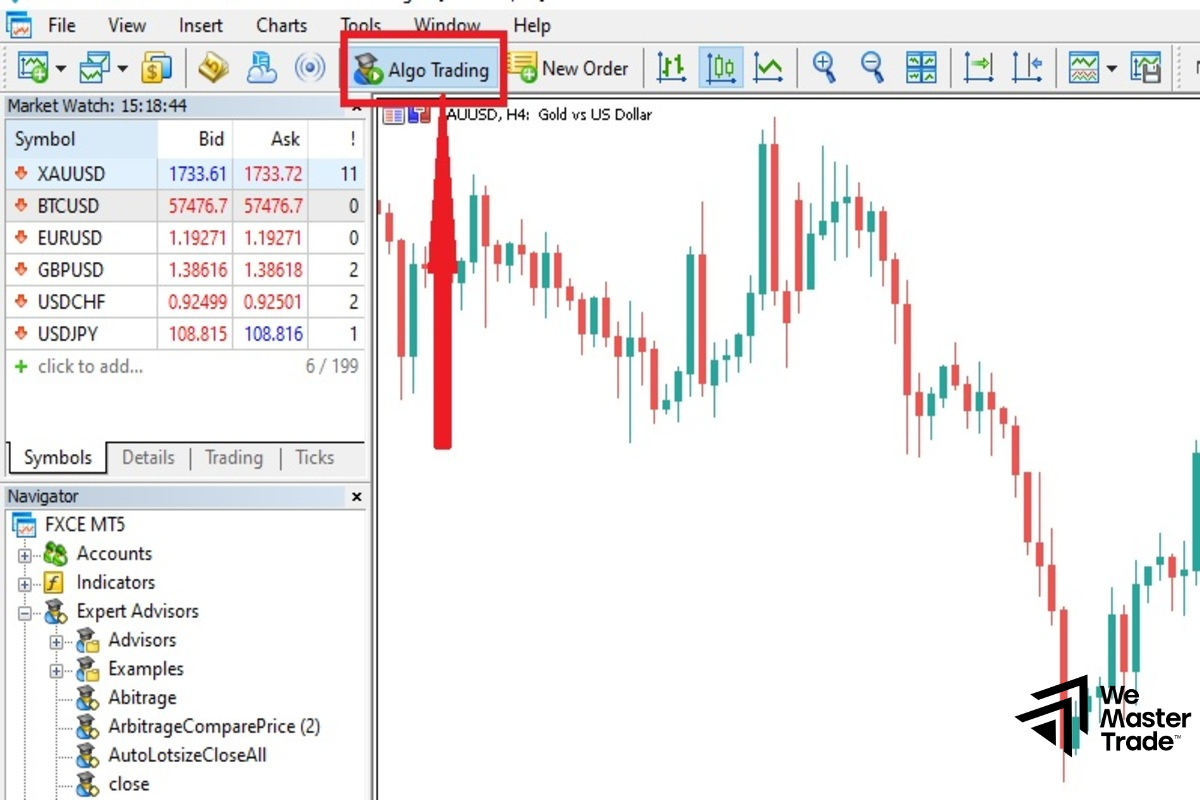
Test and run

Pros and Cons of Using an EA

Key advantages

Automated trading robots completely eliminate emotional factors—the leading cause of poor trading decisions. EAs can monitor the market and execute trades 24/7 without missing any opportunities.

Pre-programmed trading algorithms ensure consistency in strategy execution. EAs can also handle multiple currency pairs simultaneously, which is difficult for manual traders.

Disadvantages to consider

EAs cannot adapt to unexpected events or major fundamental changes in the market. Trading robots rely entirely on the quality of the algorithm—if the strategy is weak, results will be unsatisfactory.

Risk management remains critical—an EA can cause significant losses if not properly monitored and if parameters are not adjusted appropriately. Traders need to clearly understand the EA’s logic rather than relying on it completely.

Tips for Using EAs on MT5

Tips for Using EAs on MT5

Always thoroughly test an EA using the Strategy Tester with at least 1–2 years of historical data before live deployment. Run it on a demo account for 1–2 months to evaluate performance under real market conditions.

Choose a broker that provides strong support for automated trading, with low spreads and fast execution. If you want the EA to run 24/7, consider using a Forex VPS to ensure a stable, uninterrupted connection.

Do not allocate all your capital to a single EA—diversify across multiple strategies and currency pairs. Regularly monitor and adjust EA parameters according to market fluctuations to maintain optimal performance.

See more:

Join Our
Trading Team!

Star Star Star Star Star Transparency Partner FXVERIFY

WeMasterTrade Reviews Verified by FXVerify

Clients are provided with an account containing virtual funds as part of our funded trading model. Their trading activity on the virtual account is replicated in real-time by our exclusive algorithms to our live firm trading account, generating actual cash flow.

Hypothetical Performance Closure

Hypothetical performance results have many inherent limitations, some of which are described below. No representation is made that any account will likely achieve performance-based rewards or losses similar to those shown. There are frequently sharp differences between hypothetical performance results and the actual results subsequently achieved by any particular trading program. One of the limitations of hypothetical performance results is that they are generally prepared with the benefit of hindsight. In addition, hypothetical trading does not involve financial risk, and no hypothetical trading record can completely account for the impact of financial risk on actual trading. For example, the ability to withstand losses or to adhere to a particular trading program despite trading losses is a material point, which can also adversely affect actual trading results. There are numerous other factors related to the markets in general or to the implementation of any specific trading program, which cannot be fully accounted for in the preparation of hypothetical performance results, and all of which can adversely affect trading results. Testimonials appearing on this website may not represent other clients or customers and are not a guarantee of future performance or success.

Hypothetical Performance Disclosure – CFTC Rule 4.41

Simulated or hypothetical trading results have inherent limitations. Unlike actual performance records, they do not represent real trading activity and may be designed with the benefit of hindsight. No representation is being made that any account will, or is likely to, achieve profits or losses similar to those shown or implied.

Risk Disclosure

This is not an investment opportunity. You do not deposit any funds for investment. We do not ask for any funds for investment. At no time do you risk your own capital. There are no promises of rewards or returns. Trading contains substantial risk and is not for every investor. An investor could lose all or more than the initial investment. Risk capital is money that can be lost without jeopardizing one's financial security or lifestyle. Only risk capital should be used for trading, and only those with sufficient risk capital should consider trading. Past performance is not necessarily indicative of future results.

Customer Compensate Disclosure

All trades presented for customer compensation should be considered hypothetical and should not be expected to be replicated in a simulated trading environment. All accounts in the WeMasterTrade program may represent simulated trading accounts. Payments are collected and facilitated by Wecopy Fintech LTD (Company Number: 14905703), 71-75 Shelton Street, Covent Garden, London, United Kingdom, WC2H 9JQ, acting as a Payment Agent on behalf of WeMasterTrade, with the applicable entity determined based on the user’s location and selected payment method.

Complaint Resolution Process

If you believe you are entitled to compensation due to a platform error or system malfunction, please contact support@wemastertrade.com within 7 days of the incident. Our team will review and respond within 5 business days. If the complaint is valid, compensation will be processed within 14 business days.

Compensation is limited to the value of the service fee paid for the affected account. WeMasterTrade is not liable for losses resulting from market conditions, user error, or third-party service interruptions.

Restricted Countries

WeMasterTrade does not provide trading accounts service to residents of the Vietnam, Israel, Russia, North Korea, Iran and some other countries.

Metatrader 5 platform does not provide trading accounts service to residents of the Vietnam, USA, Canada, Israel, Russia, North Korea, Iran and some other countries.

Chat
Complaint & Review Form