












In financial trading, relying solely on lagging technical indicators can sometimes cause traders to miss critical movements at the market’s “core.” At Wemastertrade, we believe that to truly master the game, you need to see through the flow of money. That is why Depth of Market (DOM)—also known as market depth—has become an indispensable tool on the MetaTrader 5 (MT5) platform.
This article will guide you step by step on how to use DOM to read market orders like a professional trader.
1. What is Depth of Market (DOM)? Why should traders care?
Depth of Market (DOM) is a data table that displays pending orders at different price levels around the current market price. If candlestick charts show you price history, DOM reveals the “intentions” of market participants in the near future.
Why is DOM important?
- Liquidity transparency: You can clearly see how much volume is waiting to buy or sell at each price level.
- Detecting “whales”: Sudden spikes in large order volumes often signal the presence of major financial institutions.
- Optimized entries: Helps traders execute scalping strategies more effectively while minimizing slippage.
At Wemastertrade, accurate Level 2 pricing data makes the DOM on MT5 more powerful than ever, allowing you to visually observe the tug-of-war between bulls and bears.
2. How to open and set up DOM on MetaTrader 5
To start using DOM on MT5, follow these simple steps:
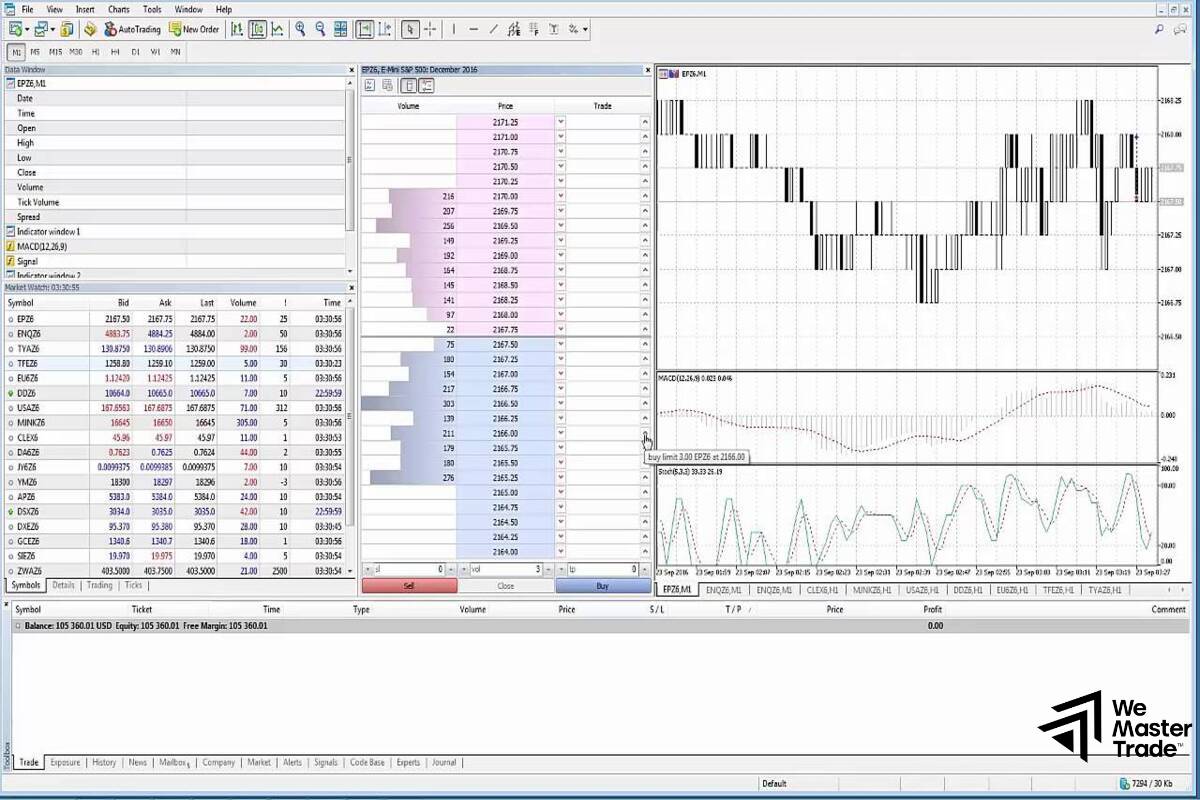
- Open the window: Right-click on the chart of the currency pair or asset you are trading and select Depth of Market (or use the shortcut Alt + B).
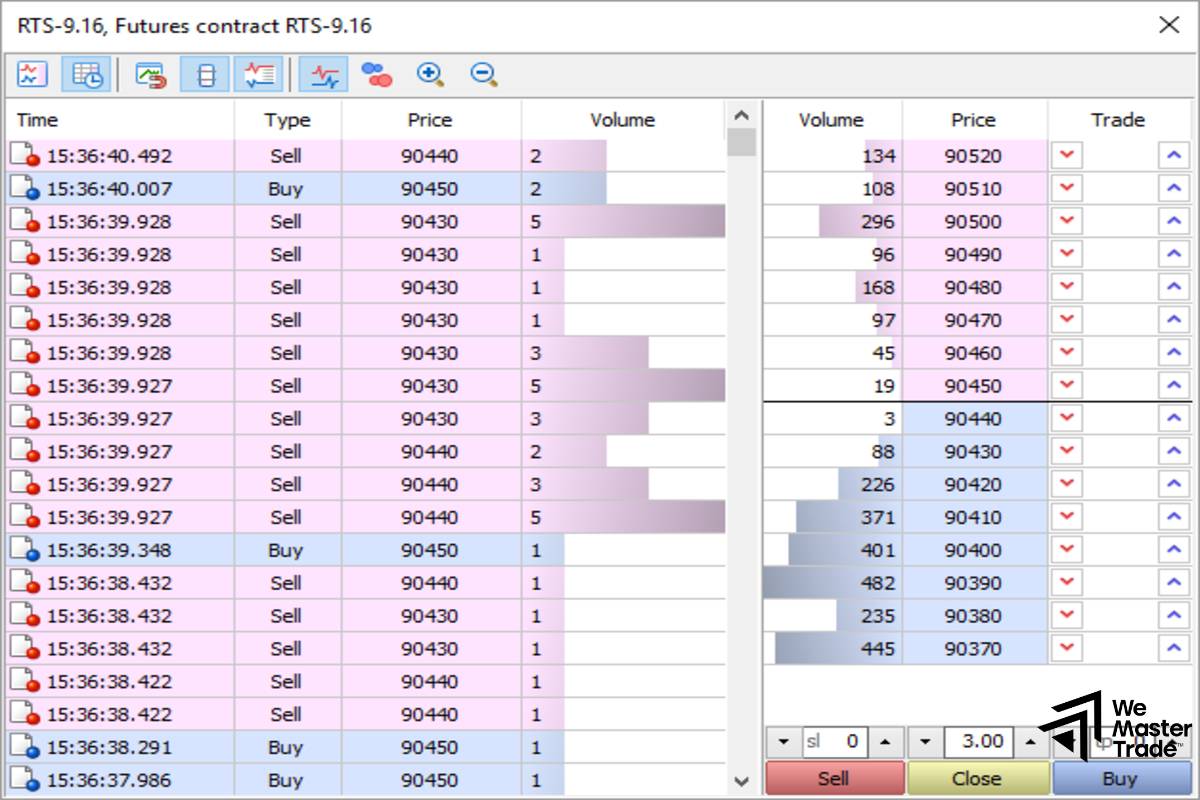
- Interface: A data panel will appear with two main columns—Bid (Buy) on the left and Ask (Sell) on the right.
- Customization: You can add columns such as “Trade” for quick order execution or display volume as bar charts to better visualize liquidity clusters.
3. How to read key data on the DOM panel
To effectively read market orders using DOM, you must understand its structure:
Price column
Located in the center of the table, it shows real-time price levels. The current market price usually sits in the middle, separating the buy and sell zones.
Pending order volume
This is the heart of DOM. It displays the total number of lots or contracts waiting to be filled.
- High-volume clusters: Often act as strong psychological support or resistance levels.
- Thin liquidity zones: Price tends to move through these levels very quickly due to a lack of opposing orders.
Supported order types
On the MT5 DOM panel, you can quickly place:
- Buy Limit / Sell Limit: Place your order at a price better than the market price.
- Buy Stop / Sell Stop: Place orders to follow the trend.
4. Order flow and liquidity strategies using DOM
Experts at Wemastertrade often combine DOM with technical analysis to improve win rates using the following techniques:
Identifying “real” support and resistance
Sometimes a chart shows a resistance level, but the DOM reveals very little sell volume there—indicating that the level may be easily broken. Conversely, seeing thousands of lots waiting to sell at a specific price confirms a true liquidity wall.
Spotting liquidity traps (fakeouts)
“Whales” may place large pending orders to create false market sentiment, then cancel them just before price reaches that level. Monitoring how quickly volumes change on the DOM helps you determine whether buying or selling pressure is genuine or merely a market illusion.
Ultra-fast scalping with One-Click Trading
For scalpers, speed is everything. DOM on MT5 allows instant execution of market orders with a single click or quick drag-and-drop pending orders. Combined with Wemastertrade’s ultra-fast execution speed, this minimizes latency to the greatest extent possible.
Follow us for more information:
- How to Use and Customize MT4 Charts : Setting Up Your Interface Like a Funded Trader
- What Is an MT4 VPS? Why Traders Using Robots (EA) Must Have a VPS
- Backtesting Trading Strategies on MT4: The “Acid Test” Before Getting Funded
5. Important notes when using DOM on MT5
Although Depth of Market is a powerful tool, keep the following in mind:
- Broker-dependent data: In decentralized Forex markets, DOM usually reflects liquidity only from the broker’s connected liquidity providers. That’s why choosing a reputable broker like Wemastertrade is essential for market-accurate data.
- Not the whole picture: DOM shows intent, but actual price movement is driven by executed market orders. Combine DOM with the Times and Sales tool to see which orders are truly being filled.
- Market psychology: Crowd emotions can lead to liquidity sweeps before price moves in its true direction.
6. Why trade on MT5 and experience DOM at Wemastertrade?
To unlock the full power of Depth of Market, traders need a fair and transparent trading environment. Wemastertrade proudly offers:
- Advanced ECN technology: Direct connections to major banks and financial institutions, providing authentic Level 2 data.
- Ultra-low spreads: Making DOM-based trading more cost-effective, especially for scalping strategies.
- Stable platform: Powerful servers ensure DOM data updates every millisecond without lag or disruption.
Conclusion
Understanding and mastering Depth of Market (DOM) on MT5 will give you an entirely new perspective on the market. Instead of guessing, you are observing real numbers, real volume, and real money flow.
Start practicing order book reading on your Wemastertrade account today and experience the difference in every single trade.